
Ahh EndPoint Detection and Response (EDR), the thing that solves everything… oh wait.
Oftentimes when I’m meeting with customers, whether they’re big or small, I always ask one question when we’re talking about security: “What security solutions do you have installed on your domain controllers?”
Shockingly, I’ve discovered that the answer is either ‘Nothing’ (insert internal screaming here) or ‘We have this EDR solution in place’ (slightly less internal screaming). Both of these are bad to hear. Obviously, having an EDR solution in place is better than nothing, but they’re both worse than not having a proper Identity Threat Detection and Response (ITDR) solution in place.
For customers who have an EDR solution in place, I’ll ask them to clarify which one, because maybe it’s an EDR solution that also does ITDR, like Defender for Endpoint (MDE), which, once activated in the Defender for Identity portal, enables its ITDR features (aka Defender for Identity).
Don’t get me wrong, there are plenty of great ITDR solutions out there, like CrowdStrike Falcon Identity Threat Protection. Just please make sure you set up the integration into Entra, otherwise you’re losing out on response capabilities and auto-remediation.
What is ITDR?
Identity Threat Detection and Response is a cybersecurity approach focused on identifying, investigating, and stopping identity-based attacks as they happen. ITDR solutions continuously monitor user authentication activity, evaluate access behaviors, and respond to identity based threats like stolen credentials, unauthorized privilege elevation, and attacker movement across systems.
How ITDR differs from EDR
ITDR and EDR work together but address different security layers. EDR focuses on endpoints (workstations, laptops, and servers), detecting malware, exploitation attempts, and system-level compromises. ITDR, however, centers on identity activity, flagging credential misuse, privilege abuse, and suspicious authentication attempts.
Examples of ITDR solutions:
- Microsoft Defender for Identity
- CrowdStrike Falcon Identity Threat Protection
- Semperis Directory Services Protector
The term became more widely used as organizations realized that traditional EDR doesn’t provide deep visibility into identity-specific attack techniques, especially those targeting Active Directory and cloud identity platforms.
Case Study
Below is a (somewhat) real situation that happened. In this case study, we’re going to look at the company Space Landing.
Environment
Space Landing is a hybrid password hash sync M365 environment with an EDR solution installed on their domain controllers that does not act as an ITDR. Space Landing has an employee named David Jones.
What Happened
David is working late on a Friday evening, going through his email, when he sees that he won the Spanish National Lottery. His luck is finally turning around. He clicks on the link and is prompted to enter his credentials to verify he is really the person who won.
He enters his credentials, goes through standard push app MFA, and gets to the “Claim Your Prize” page. He enters his social security number and wires them some good faith money to unlock his earnings.
The Tools Respond
Defender for Office 365 and Entra ID Protection spring into action, disabling his account and sending alerts to Sentinel. However, Space Landing does not have a 24/7 SOC, and David is off celebrating being $400 richer, completely unaware that he was just phished.
Monday Morning
Come Monday morning, IT logs in and sees an alert for David. He had an email link click alert and suspicious sign-ins. Upon further investigation, they notice something strange.
- His account is enabled
- A new MFA method was registered
- The attacker still had access
Why It Happened
Since Space Landing did not have an ITDR solution in place, the auto remediation never disabled David’s on prem Active Directory account. The EDR solution they had installed did not really have line of sight to what was happening.
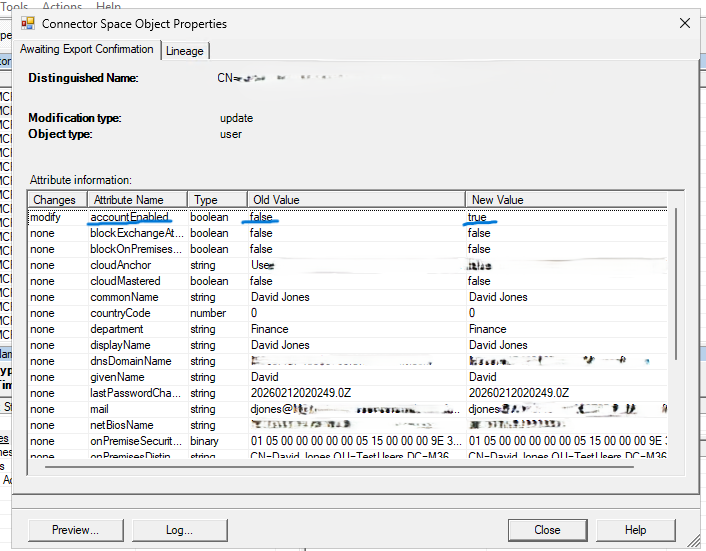
When the next Entra Connect sync ran, it saw that the on prem account was enabled but the cloud account was disabled. Because on prem was the source of authority, it re-enabled the cloud account.
Maybe Space Landing just has bad luck, or maybe it is just the universe giving them the middle finger. The Entra Connect sync happened 27 seconds after David’s account was disabled automatically by Entra ID Protection. It occurred so soon after his account was disabled, the attacker did not even get interrupted. Even if he did, this attacker was able to register a new MFA method to keep access.
Just like that, auto remediation was automatically undone.
Lets See This In Action
Lets take a look at how this looks when MDI is not installed and when it is installed on the domain controller.
Blocking Sign In from Defender
Here, we can block David Jones from being able to sign in from the Defender portal. You can find this option here:
Defender Portal > Assets > Identities > Users > (select user) > top right three dots > Block user
This is essentially the same thing auto remediation or attack disruption will do. You just click that option and select Block sign in. Normally, this works pretty quickly.
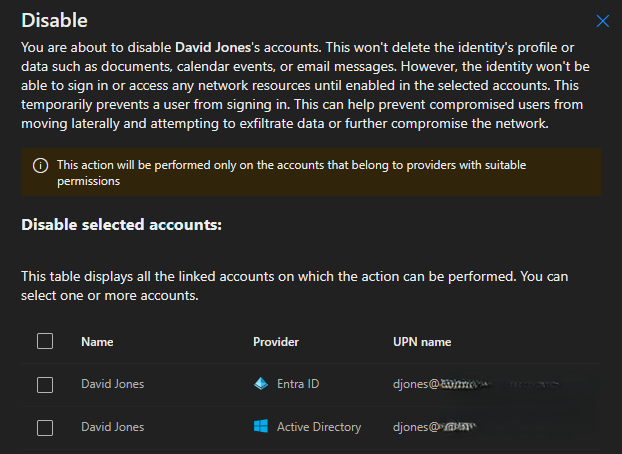
Something to note about this picture. At this point, I still did not have MDI installed in this environment. The only thing running was Entra Connect syncing every 30 minutes. Even so, it shows “Disabled selected accounts” and says, “The table displays all the linked accounts on which the action can be performed. You can select one or more accounts.” Since MDI is not installed, this action should not actually do anything, even though it implies it will. I have not confirmed yet whether this is expected behavior or a bug. If you happen to know the answer, I would be glad to hear it.
After I selected “Block” for David’s Entra account, a few minutes passed and we checked on prem to review the sync logs. Sure enough, his account was blocked in the cloud, but then on prem overrode it and re enabled his account.
Now Lets Look at This With Defender for Identity Installed
What you are about to see is unique to Defender for Identity because of its native integration with Entra and the rest of the Defender suite. We will talk more about that below.
After MDI is installed on the domain controller, I go back into the Defender portal, and now we see this:
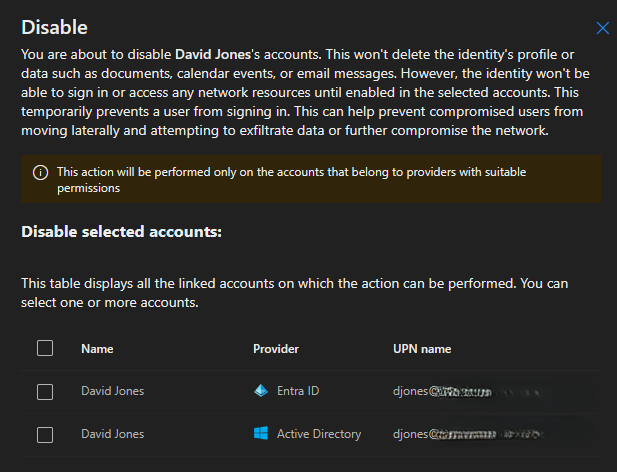
It looks exactly the same, but this time the block option next to Active Directory will actually do something.
To keep things simple (we will do more advanced attacks in later blogs), I am just going to do a basic session hijack (via a phishing email) and then sign in from halfway across the world. That should be enough for Defender and Entra to get upset.
For this demo, I had to switch from David Jones to John Smith. David’s account was too new, and Defender and Entra would not reliably flag it as compromised and trigger attack disruption. So meet John Smith, our new victim, who is about to have a very bad day.
THE ATTACK BEGINS (cue dramatic music)
I sent John Smith a phishing email telling him that he also won. It did not look like anything special. If you want to see it, read below. Note: the phishing URL has since been taken offline.

John saw this as his chance to win the Spanish National Lottery (what is going on at Space Landing?). Being the silly goose he is, he clicked, entered his credentials, and then went off to celebrate his “win”. Classic John.
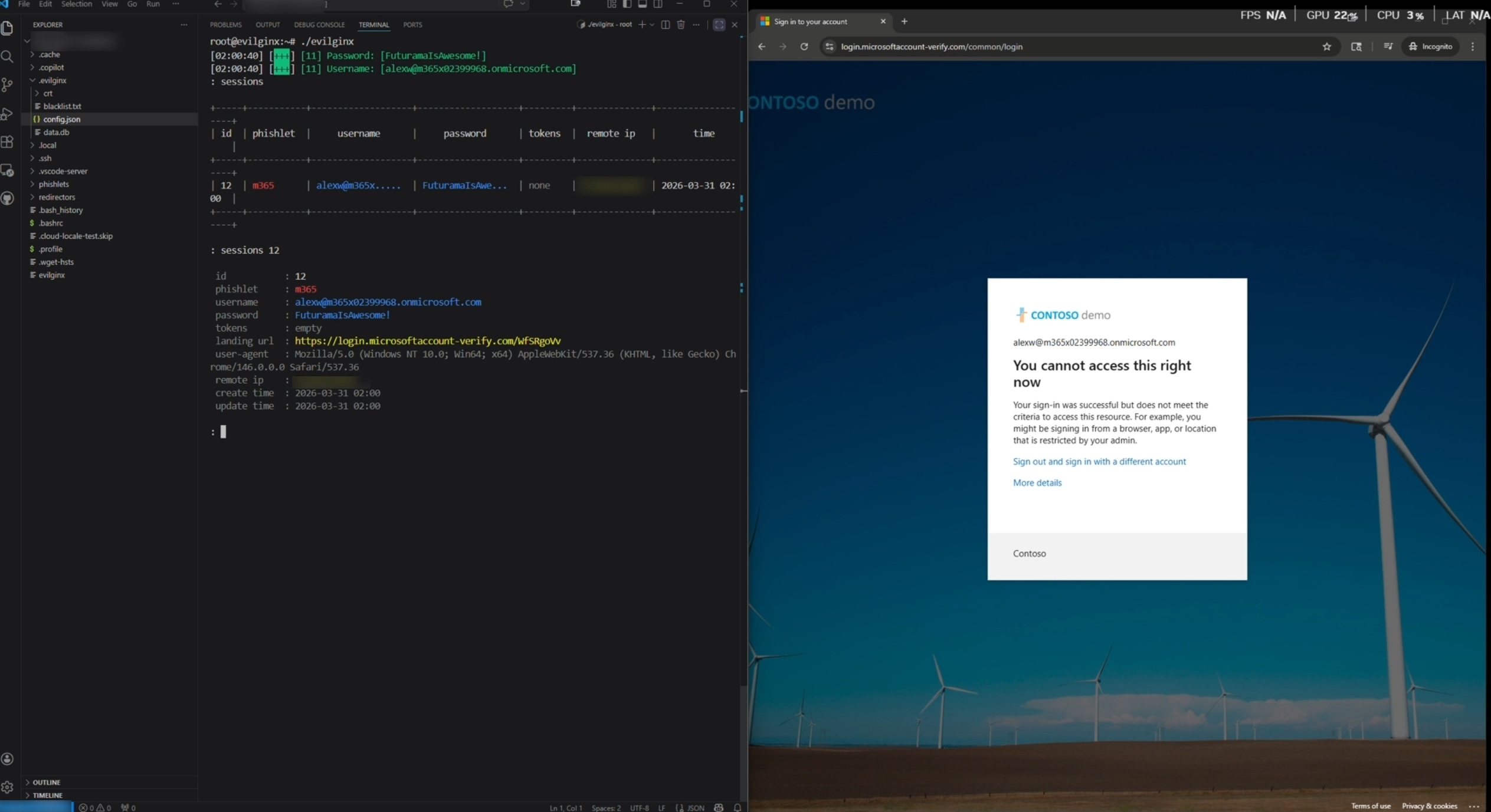
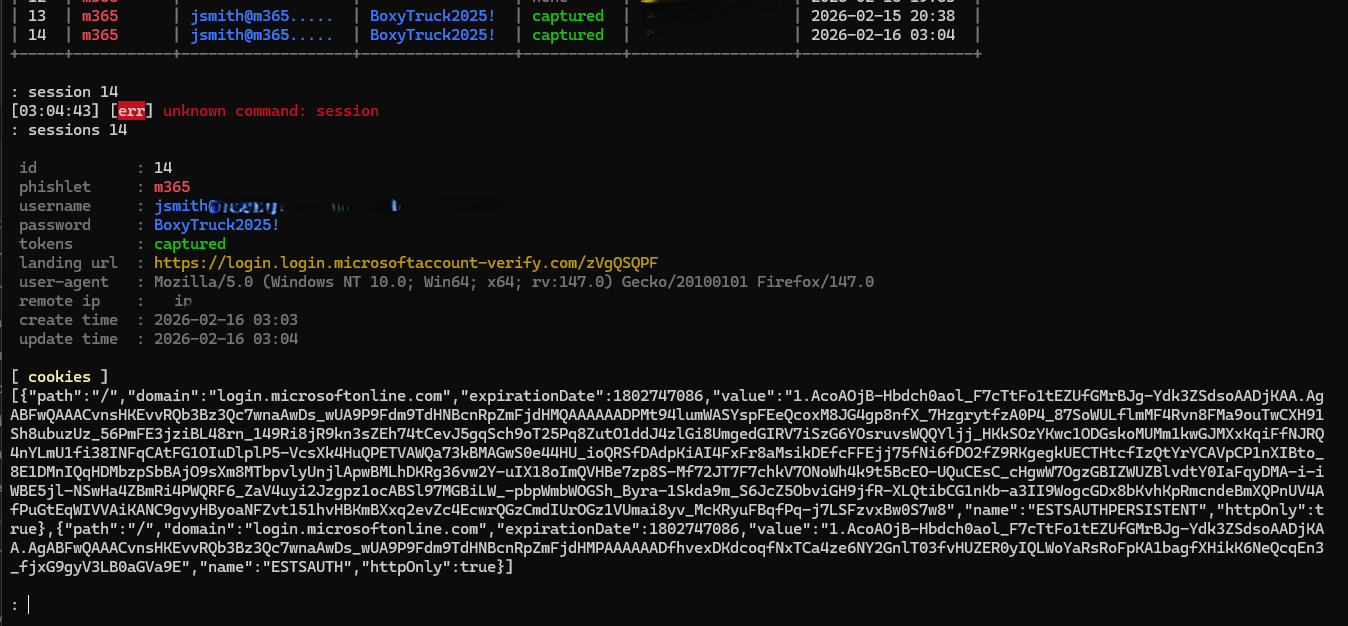
Anyways, if you have not seen what a “Man in the Middle Attack” looks like, this is the output. Note that you can see the username and password in plain text, and you can also see the session cookie.
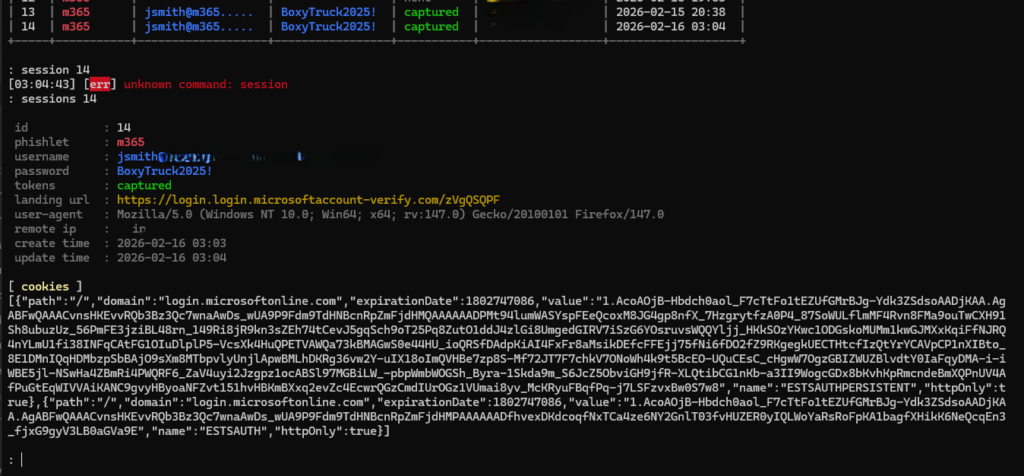
I copied that bad boy and used it to sign in from my laptop, which is currently “on vacation” in Russia (I heard the Russian winters are amazing). The only thing I used to import the cookie was a simple cookie extension for Firefox. Then all you do is refresh.
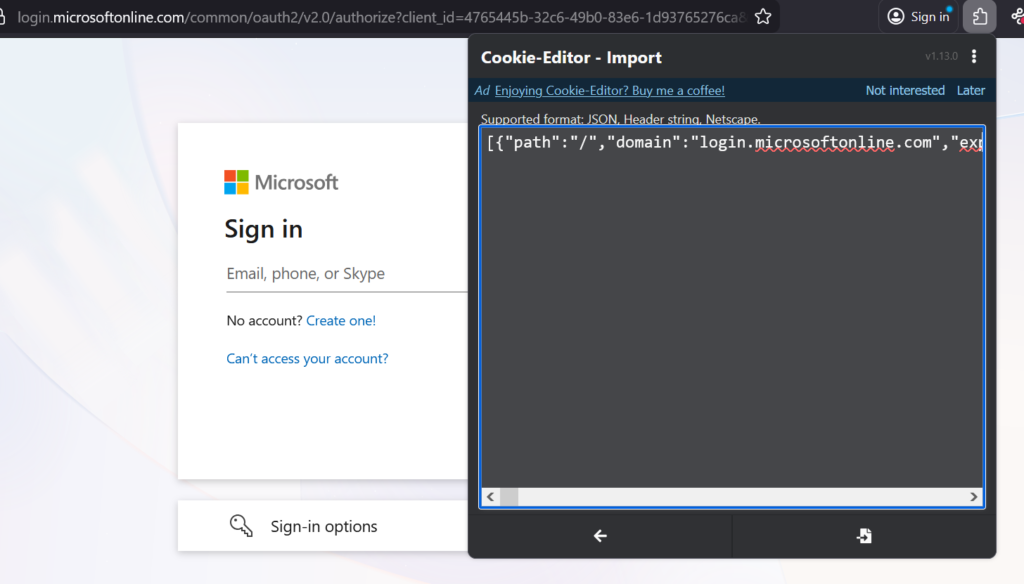
But this victory didn’t last too long. After a few minutes, I was kicked out of my session and when I tried to login again I see this:
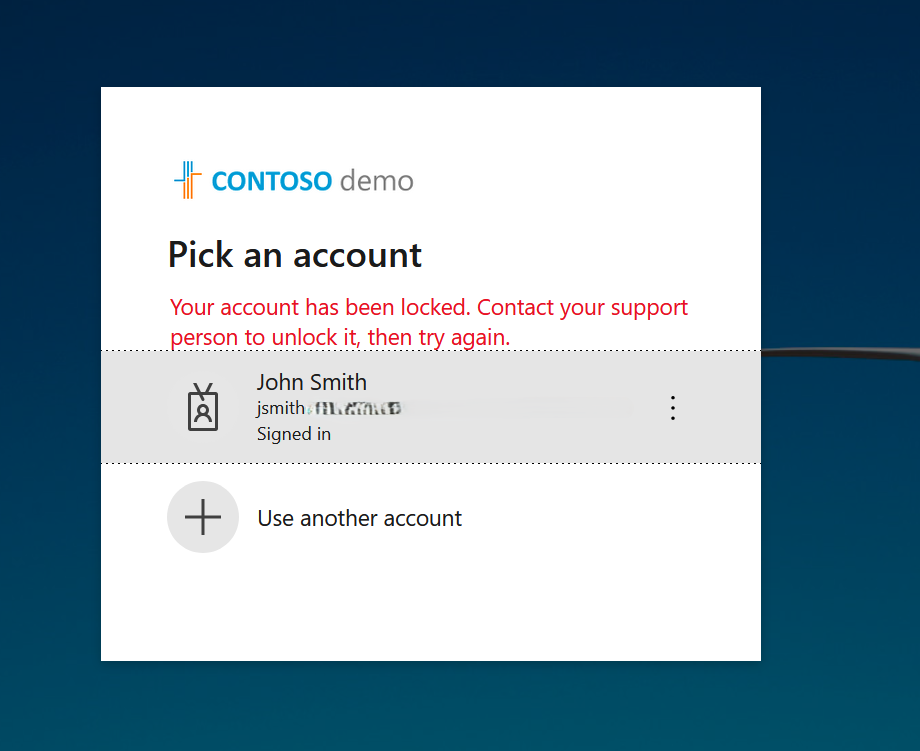
This time around, I got kicked out, but it is not a problem. I already know the username and password, and I was even able to get a backup MFA method set up in time. All I need to do is wait for Entra Connect to sync again and then re enable the account.
Oh wait. What is this? DEFENDER FOR IDENTITY IS COMING OUT OF NOWHERE WITH A CHAIR AND JUST DESTROYED THE SESSION COMPLETELY.


As you can see, MDI disabled the on prem account, which prevents it from being enabled again the next time the Entra Connect sync runs.
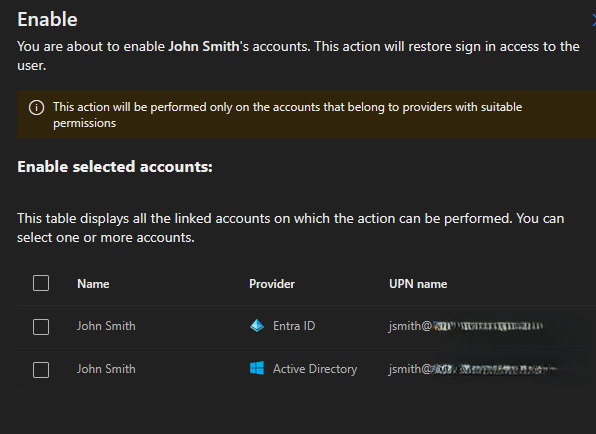
Now all we have to do is go into Defender Portal > Assets and find John. Then, on the right side, take action and enable him again. As you can see, we can enable him in both Entra and Active Directory. Remember, these have to match. If AD is disabled and Entra is enabled, then when the next sync runs, he will be disabled again.
Layered Security
This whole situation at this company was a bit odd. It was full of examples where they were not following best practices or even industry standards. They also were not using features they already had available to them.
You are probably asking yourself, “Wouldn’t Risky Sign In or Risky User prevent this?” And the answer is, yeah, probably for the cloud sign-in. And those controls are not perfect either. We have seen them fail to apply as well, especially when a user travels a lot. But that alone would not have solved the problem, because the on-premises account was still enabled. What if that email downloaded malware and used the computer as a jump box? Maybe their EDR solution would’ve caught that, maybe it wouldn’t of.
You are also probably asking why Defender for Office did not stop a clearly phishing email. In this case, the Spanish National Lottery was just a fun twist I added (Futurama anyone?). In reality, the phishing email they received was very specific to them, and it really does not change anything. Phishing emails get through, it happens.
That is why it is important not to have a single point of failure. You need layered security so one gap does not undo everything, like it did in this situation. When email controls miss, identity protections should still flag and block abnormal sign-ins and shut down risky sessions. When identity signals miss, least privileged should be in place to contain the blast radius. The goal is not perfection in any one tool. It is forcing an attacker to get lucky multiple times in a row.
Key Takeaways
So what did we learn today?
- Hybrid environments need ITDR on domain controllers, not just EDR. Your cloud security is only as strong as your weakest on prem link.
- The fear of long words is called hippopotomonstrosesquippedaliophobia. The fear of not having ITDR should be called common sense.
- MDI’s native integration helps prevent on-prem from re-enabling a compromised account. It disables accounts at the source of authority, so Entra Connect cannot undo your security controls.
- If you use a 3rd party ITDR solution, make sure it can disable on-prem accounts when the cloud account is compromised.
- Julius Caesar was once kidnapped by pirates. He told them they were not asking for enough ransom money.
No animals were hurt in the making of this blog.
I hope you learned something. If you feel you did not, please contact your local representative for a refund. Note refunds are currently experiencing longer than usual waiting times. Estimated refund time is 5896 business weeks.
To submit a refund request click here