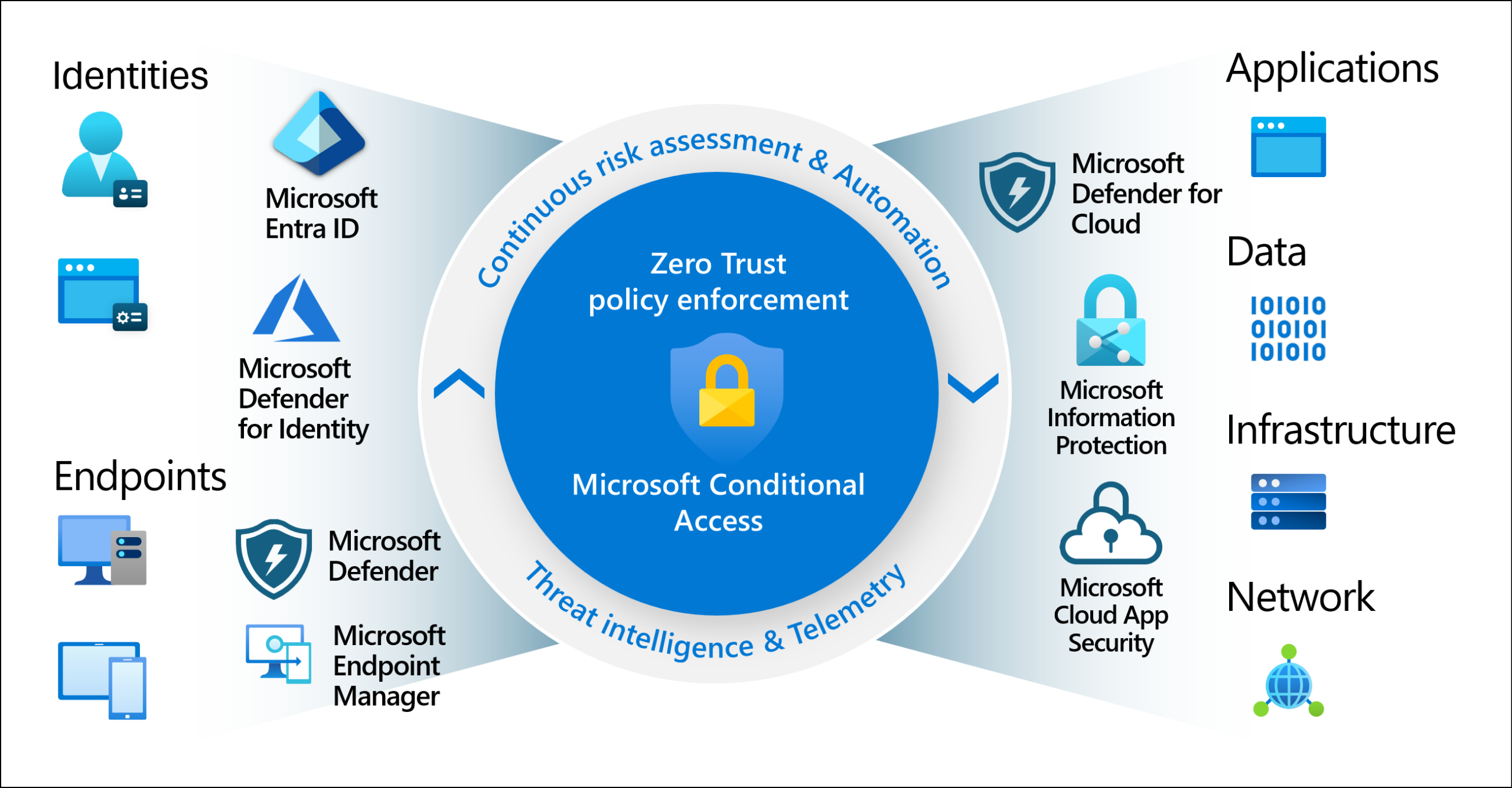

A while back, Microsoft released a feature called Token Protection in Microsoft Entra ID. It’s a Conditional Access policy designed to help reduce token theft replay attacks, and if you’re not familiar with token theft, it’s worth a quick explainer before we dig in.
Token theft is exactly what it sounds like. An attacker gets hold of your authenticated session token and uses it to access your environment without needing your password or MFA. There are several ways this can happen: malware pulling tokens from browser storage or memory, stolen session cookies being replayed, credentials cached in developer environments, and OAuth abuse, just to name a few.
One of the most common methods right now is Adversary-in-the-Middle (AiTM) phishing. An attacker sends you a link that looks convincing. You enter your credentials, maybe even complete an MFA prompt, and get redirected. It looks and feels completely normal, but it wasn’t.
A proxy was sitting between you and M365 that captured your entire authenticated session token, and the attacker now has everything they need to walk right in. They don’t need your username, password, or even MFA at this point. In a browser based session, that token lives inside a session cookie. And that cookie is exactly what was just stolen. They can paste it right into their browser and log in with your account.
Conditional Access in Microsoft Entra ID has a feature called Token Protection that was built specifically with this kind of attack in mind. Which is great… in theory. But…..

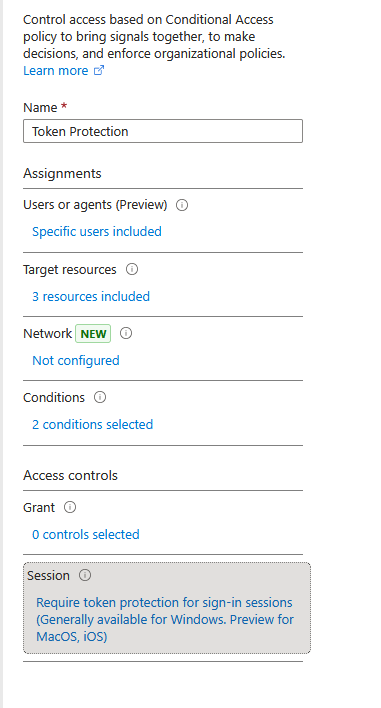
Why do I say it’s useless (sorta)? Well let’s test this and see how it works. First let’s create the Conditional Access policy. We will follow Microsoft’s documentation to create this. Note how the documentation specifically tells you to only configure this for “Mobile apps and desktop clients” and warns against leaving “Browser” selected. That little detail is going to matter in a moment. (This is something in the Police world we would call a clue)
Let’s craft the phishing email. I went with a lifetime supply of Grandma’s Chocolate Chip Cookies. Who wouldn’t click that? Surely John will fall for this one, though honestly I have a feeling he’d click anything I send him.
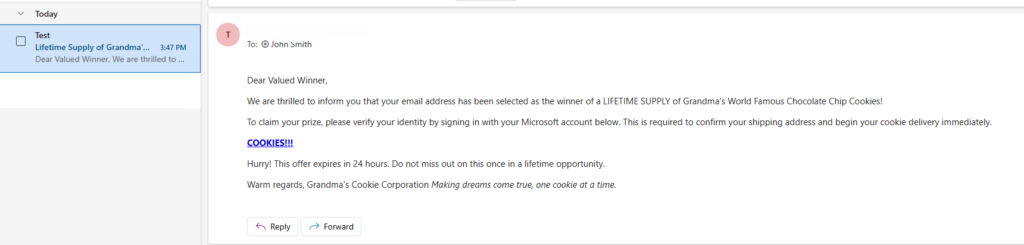
Here we have the good ole phishing link that none other than THEE John Smith is going to click on. Like in my other post about why EDR is not enough for on-prem domain controllers, we’re going to use a very similar delivery method. I’ll email John this phishing email and he’s going to open it from the Outlook desktop application (the email client doesn’t change the outcome here, John was always going to click the link).
John clicks the link to claim his lifetime supply of Grandma’s Chocolate Chip Cookies. He can’t believe his luck. Last week he won the Spanish National Lottery and now a lifetime supply of cookies? Some people just have all the luck.
John does everything right. He enters his username, his password, and even jumps through the MFA hoop.. He gets redirected to the M365 portal and sits there quietly, wondering when his lifetime supply of cookies is finally going to arrive. (Note the URL and company branding)
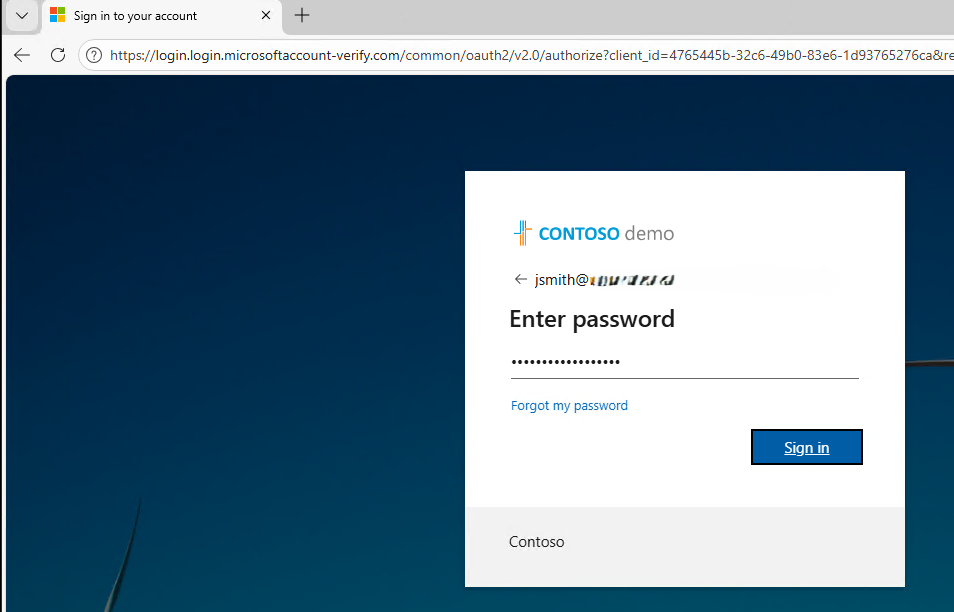
Spoiler: he did get a cookie. Just not the kind he wanted.
While John was waiting for his cookies, his session cookie was quietly packed up and shipped off to an attacker’s machine. The attacker didn’t just steal John’s password. They stole his authenticated session.
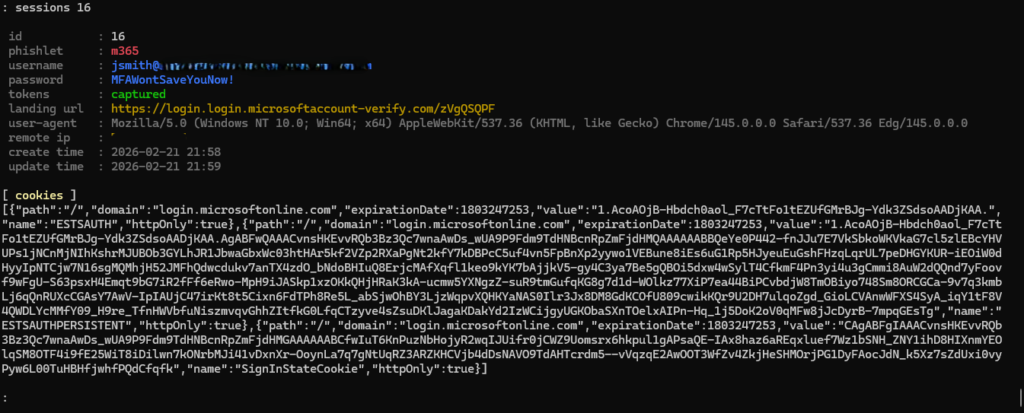
As you can see, the session was captured and the cookie was extracted. At this point, the attacker has everything they need. No credentials required. All this attacker needs to do now is paste this cookie into a browser with a cookie injector.
Now, you might be thinking: “But we have token protection enabled, so this shouldn’t work, right?”
Right. Let’s test that theory.
Using a cookie injector, I take the stolen cookie and drop it into the browser. One injection, one refresh, and we find out pretty quickly whether token protection is actually doing its job.
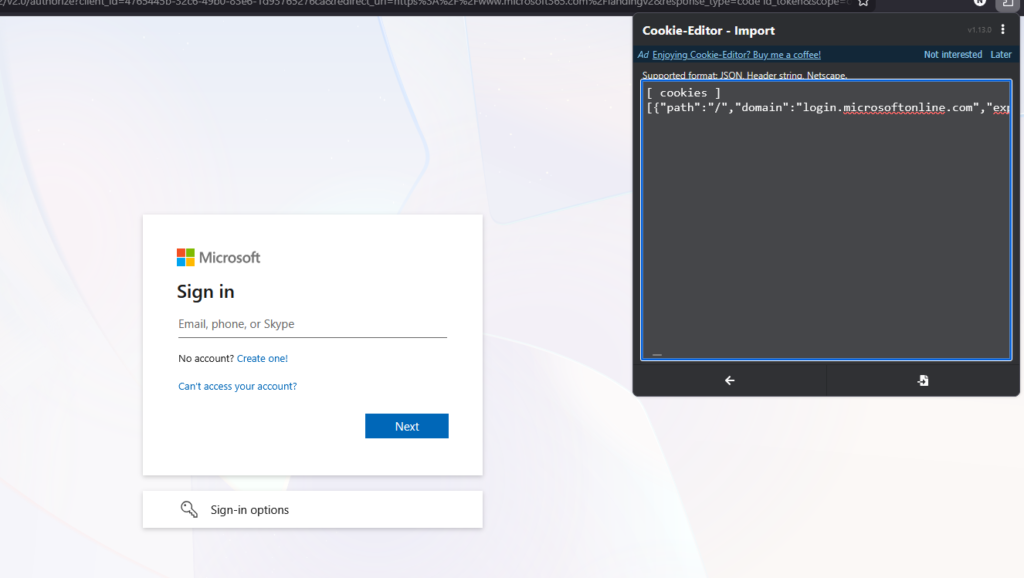
I click refresh and… drum roll please.
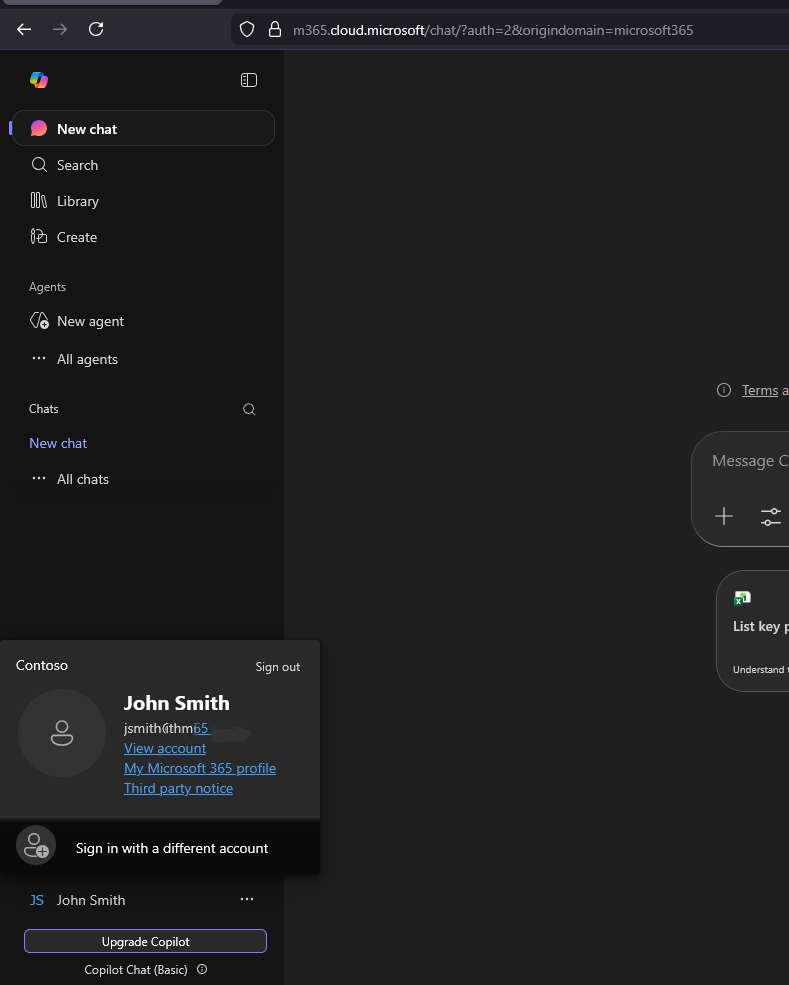
We’re in. So why didn’t Conditional Access save us?
Remember that CA policy we set up with token protection?
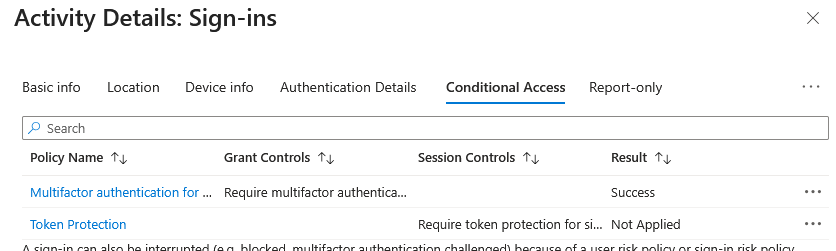
There’s a catch that is easy to miss. Token protection in Conditional Access policies currently only supports a limited set of clients. Browsers are not supported targets for token protection enforcement. So when the attacker injected that cookie into a browser, Conditional Access looked at the situation and shrugged.
Basically this is what happened:

Because the sign-in happened in the browser, it completely bypassed the Conditional Access policy. That policy was targeted at mobile and desktop applications, which, let’s be honest, are generally not how attackers are logging in. So what is the point of this feature then?
Well… it does block attackers from getting into desktop applications. So there’s that. I guess?
Now you’re probably saying “Hey Nick, you’re awesome and amazing.” And you would be right. But you’re also probably saying “So what, we have no protection for token theft?”
And my answer to that is: wrong.
A lot of security controls were intentionally left out of this demo, things like risky sign-in and risky user policies, Safe Links, and requiring an Intune compliant device. Lets look into that last one there.
If you are using Intune (or a third-party MDM platform that passes compliance to M365), requiring device compliance or checking enrollment status through Conditional Access can stop this attack.
Here’s why: when an attacker tries to steals a session using AiTM, that session still gets processed as a sign-in event in M365, which means it still has to run the Conditional Access gauntlet. If your Conditional Access policy requires an Intune enrolled device or compliant device, that can stop this token theft before it even starts.
Let me show you. I won’t walk through the entire AiTM setup again, but the process is identical to before.
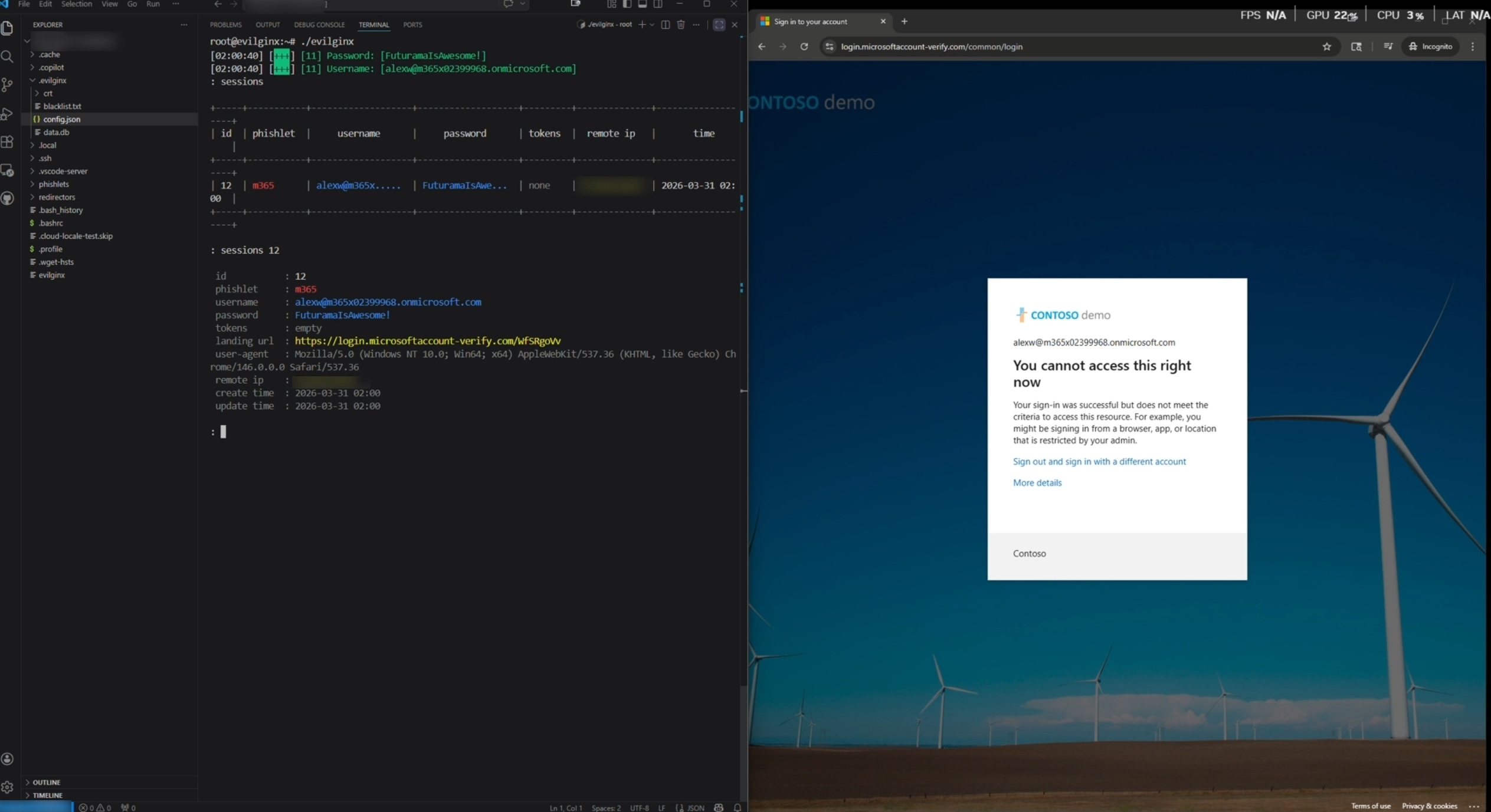
Except this time, before the session can be stolen, something happens.
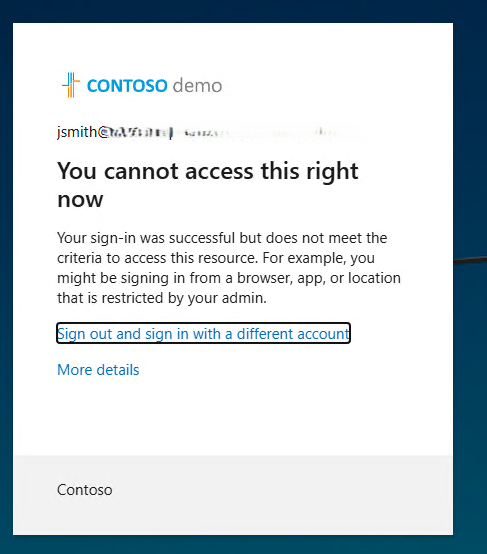
That’s weird. I’m signing in from my Entra joined and Intune compliant device, but the Conditional Access policy still blocks me. Why?
The proxy. It captures the username and password but does not pass the device information along to the login window. Since Conditional Access never sees the device info, it has no way to verify compliance, so Conditional Access does what it is supposed to do and blocks the sign-in.
So what does that look like on the attacker’s side?
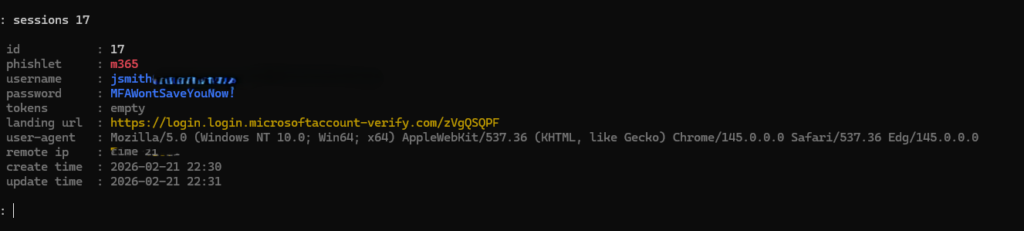
The username and password were still captured. But the session cookie was not. That is a win.
However, there are AiTM phishing techniques that can pass device information through the proxy to Entra and which would meet the Conditional Access Policy requirements
But remember the golden rule: you never put all your cards into one tool or one policy. You layer controls and force the attacker to get lucky multiple times in a row. Then you apply least privilege so that if someone does get compromised, the blast radius is as small as possible.
So what did we learn?
- Token protection in Conditional Access sounds great but currently only applies to desktop and mobile app clients, not browsers, which is exactly where this attack lives.
- The Roman Emperor Caligula once declared war on the ocean. He marched his army to the beach, ordered them to attack the waves with swords, and then collected seashells as “spoils of war.” (Dude was a real wackadoodle.)
- A Conditional Access policy requiring an Intune compliant device can stop cookie theft cold because the proxy cannot pass device information to M365, leaving Conditional Access with nothing to evaluate and causing it to block the sign-in.
- No single control is enough. Layering risky sign-in policies, device compliance, Safe Links, and least privilege forces an attacker to defeat every layer, not just one.
Did you know? There are 52! (52 factorial) possible ways to arrange a deck of cards. That number is so incomprehensibly large that this is the most common way to visualize it:
Let 52! seconds tick by on a timer. While you wait, do the following:
Stand on the equator and take one step every billion years. When you have walked around the entire Earth, take one drop of water from the Pacific Ocean. Repeat this until the ocean is empty. Then, lay a single sheet of paper down, refill the ocean, and start all over again. When your stack of paper reaches the sun, the timer will barely have changed. That’s how big 52! is.