
Have you ever looked at your tenant, seen all the guest accounts, and had this reaction?

Well, it’s not your fault…. Mostly. There are some default settings within the M365 tenant that kinda set you up for failure. These default settings allow this behavior unless you change them.
These settings can be found under Identity > External Identities > External collaboration settings in the Microsoft Entra admin center.
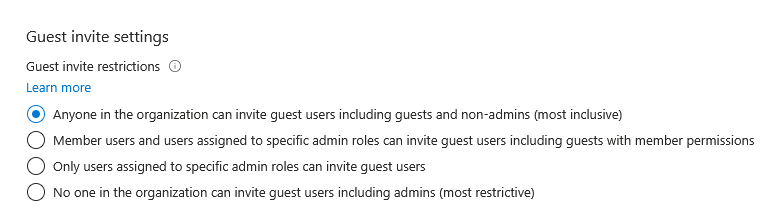

Yeah, this means any Tom, Dick, or Harry can just be invited to your tenant by anyone, even other guests. Is their domain SuperHacker5000.com? Come on in! iStealYourData.pawned? Welcome, bud!
Most admins do not realize that these settings are pretty much ticking time bombs, because here is the best part… Once they have access, unless you remove them or they themselves leave, they can just come on back any time they want.
Now it’s true, guests only have access to what you give them access to. Similar to how regular user assignments work. But there are things that you want all employees to be able to view, that not every person in the world should be able to view.
Maybe you created a dynamic security group and the rule is (user.accountEnabled -eq true). Well, now you have all guest accounts in that group as well, which means they have access to everything that group has access to.
Another thing you should consider: do guests need to perform MFA to access your tenant? Double-check to make sure that they actually do need to perform MFA. The What-If tool in Conditional Access can be very helpful for this.
So now you’ve realized you have thousands of guest accounts, now what? Well, it’s time to purge. If you have a massive amount of guest accounts, I would actually recommend using PowerShell to find these stale guest accounts and remove them that way. You could use Access Reviews to do this, which you absolutely should do going forward. But if you have several hundred or even thousands of guest accounts, PowerShell will work better for you this first time around.
Thanks to our good friends at admindroid.com, they have already created a really good script, so we don’t need to go reinventing the wheel. This allows you to find inactive guest accounts and then remove them. As always, review any third-party script before running it in your production environment.
Once you do this initial purge, it’s important to stay on top of guest accounts. By changing those settings above, you will greatly reduce the amount of junk in your tenant. But still, there are legitimate reasons for guest accounts. In that case, we will still want to monitor them and remove inactive ones. That is where Access Reviews come into play. I won’t go into how to configure those in this article, as this is more of a “warning” type of article vs. a how-to.
So now you’ve changed these default settings and no longer can anyone just invite anyone. Now what? Well, there is actually one more thing we should take a look at. You know that program called Teams? Yeah, well by default Teams lets anyone in the world message you. So do yourself a favor and head on over to the Teams admin portal > Users > External Access.
See any problems below?
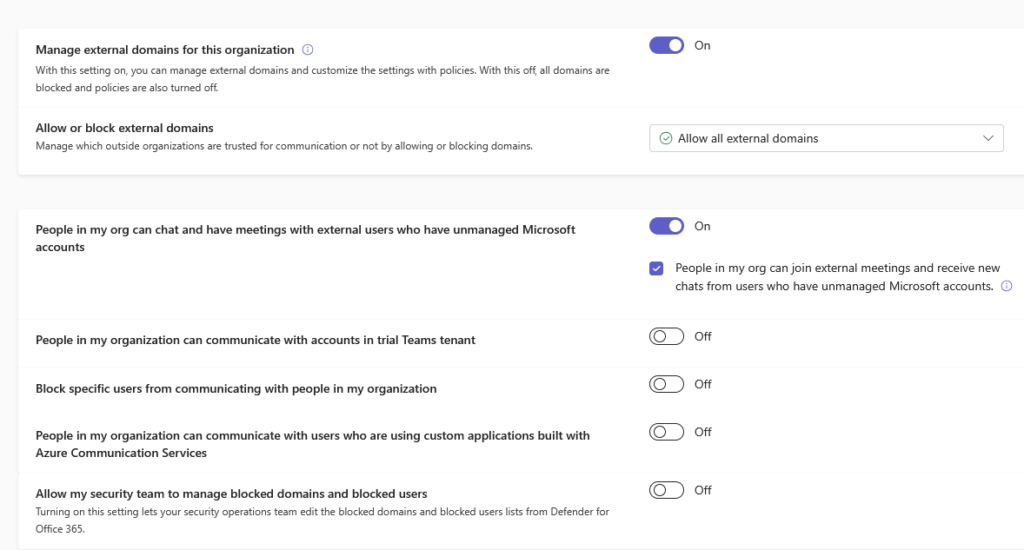
Yup, you nailed it. There is no dark mode. Also, by default, anyone can message your users on Teams from any external domain or from any unmanaged Teams account.
Why might this be an issue? Well, let’s say you have amazing email filtering that catches every phishing email with 100% accuracy. Those attackers can bypass all of that by just sending a phishing message directly to your users via Teams. So do yourself a favor and change “Allow or block external domains” from “Allow all external domains” to “Allow only specific external domains.”
Also, under “People in my org can chat and have meetings with external users who have unmanaged Microsoft accounts,” uncheck “People in my org can join external meetings and receive new chats from users who have unmanaged Microsoft accounts.”

But you’re welcome. You’ll never be able to repay me.
So what did we learn today?
1.) By default, pretty much anyone can message your users on Teams for pretty much any reason.
2.) If you removed all the empty space from the atoms in every human on Earth, the entire human race would fit in a sugar cube.
3.) By default, M365 has some awful default security settings in place regarding guest accounts.
4.) There are more possible iterations of a game of chess than there are atoms in the observable universe.