
AiTM attacks have always been that annoying mosquito that just won’t go away. In 2025 and into 2026, that mosquito got a lot bigger. AiTM phishing attacks grew 146% over the past year, and thanks to AI, that number is only heading in one direction.
There is a new arms race underway between attackers and defenders, and the question is simple: who can use AI more effectively? What was once a largely manual process, reconnaissance, finding vulnerabilities, crafting convincing lures, is now being automated at scale. Attackers are compromising organizations at record numbers, and they are doing it faster and cheaper than ever before.
It is estimated that there are 3.4 billion malicious emails distributed daily. Phishing-as-a-Service (PhaaS) has made it easier than ever for either groups of people or individuals to spin up their own AiTM attacks for very cheap. PhaaS tools like Tycoon 2FA, EvilProxy, Sneak 2FA are very easy to setup and use. Tycoon 2FA was even taken down a few weeks ago, but as of writing this article, its back up. So far as of early 2026, AiTM is projected to be the initial compromise for 42% of all global company breaches. Chances are this figure is going to be even higher than that.
Traditional MFA is no longer enough to stop AiTM attacks. Proxy-based AiTM attacks relay MFA challenges to the victim in real time, capturing the resulting session cookie and replaying it from a completely different location.
You will often hear people describe this as AiTM ‘bypassing’ MFA, which is not quite accurate. MFA completes successfully. The user authenticates exactly as intended. What the attacker actually does is relay the MFA challenge to the victim, wait for them to complete it, then steal the valid session cookie that comes out the other end and use it to log in as them.
How does AiTM work?
AiTM is rooted in the development of Man-in-the-Middle (MitM) attacks. MitM originally emerged as a way to intercept unencrypted communications between two parties. A simple way to think about it: imagine a phone call between you and your best friend, and somewhere in between, a third person picks up a phone and listens in. They are not participating, just quietly intercepting everything being said.
AiTM builds on that concept but gets considerably more complex. The attacker still positions themselves in the middle (that part has not changed), but now they can do far more than. The attacker can intercept traffic, redirect it, or actively manipulate it in transit between the two parties.
It is also worth clearing up a common misconception: AiTM is not just phishing. Phishing is one delivery method, but the technique itself is much broader. Once an attacker is in the middle, they can perform active content modification, data exfiltration, and payload injection. They can silently alter what you send, steal what passes through, or drop something malicious into a legitimate data flow. However, phishing is the most common method that you will see. Why? Because it works.
Below is a flow of how this generally works:
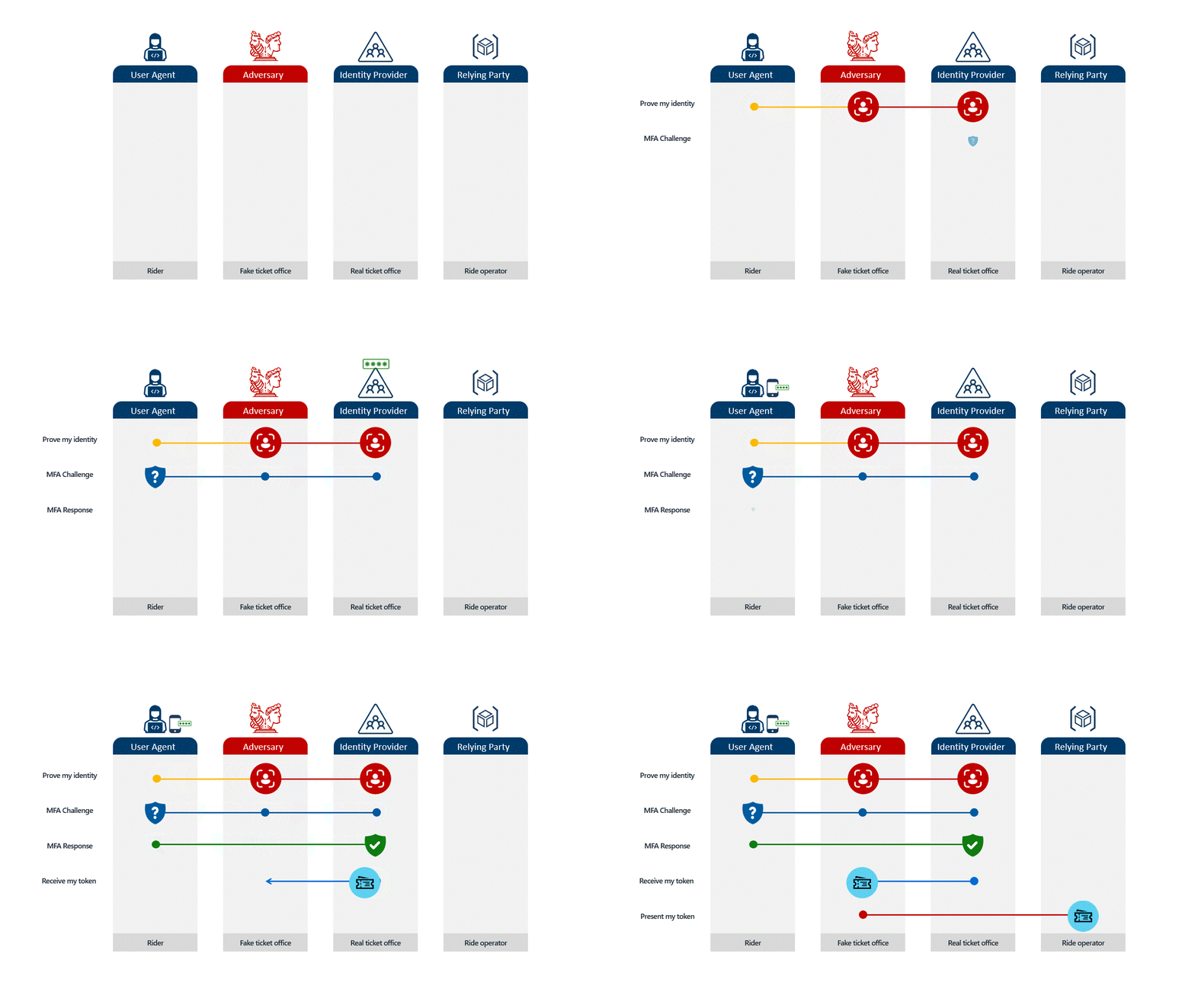
With AiTM, the attacker is not breaking encryption or guessing codes. They are simply sitting in the middle of a perfectly valid network flow, forwarding everything in real time. From the server’s perspective, the session is completely legitimate. Nothing looks wrong because nothing is wrong, at least not from Microsoft’s point of view. The attacker is not breaking in. They’re using a valid session that they stole to login. The question is, how can we prevent this?
Thankfully, organizations that use M365, have a number of options they can use to help prevent AiTM attacks from being successful. With a mix of Defender, Conditional Access, Mail Filtering and user training, AiTM doesn’t need to be an unchallenged threat. Remember, defense in depth is something all organizations should strive for.
We want the attackers to have to get lucky multiple times in a row for their attacks to be successful. Below I’ll go through some of the options we have to help either prevent or block AiTM. Since there is a lot of different things we need to do, I’ll cover it all in multiple articles.
How to protect yourself against AiTM
The story of “Enable MFA, it can prevent 99% of attacks” is moving away at light speed. Traditional MFA is no longer a blocker for attackers. As mentioned above, Proxy-based AiTM attacks relay MFA challenges to the victim in real time, capturing the resulting session cookie and replaying it from a completely different location.
However, not all MFA is created equal, within M365, there are four phishing resistant methods that Microsoft supports. All other ones do not provide any protection against AiTM attacks.
| Method | Phishing Resistant |
| FIDO2 security keys | Yes |
| Certificate-based authentication | Yes |
| Windows Hello for Business | Yes |
| Passkeys (including passkeys in the Microsoft Authenticator app) | Yes |
| Microsoft Authentication App with OTP or numbers matching | No |
| Passwordless phone sign-in (Not passkey) | No |
| Putting “No AiTM allowed” warning on the sign-in page | 38.5% of the time it works 73% of the time. |
| All other, SMS, phone call, just username and password | No |
Deploying phishing-resistant MFA across your organization might not be feasible right now, and that’s okay. It’s not a quick thing to do. Depending on what method you choose, you might need to purchase FIDO2 keys, train users, test policies, create new on-boarding procedures, build out lost key procedures, create new Conditional Access policies, get executive approval, or even bring in a partner to help. Deploying this is a marathon, not a sprint.
You might be asking yourself “If full phishing-resistant MFA isn’t something we can deploy quickly, what can I do in the meantime?” Lets introduce the next section
Conditional Access Policies (CAP)

Within M365, as long as you have the appropriate licensing you have lots of access to some pretty cool CA policies that can help mitigate or block AiTM after a user has fallen for their tricks. Note, Risky User & Risky Sign-in will be covered in a future article.
| CAP | AiTM Block or Mitigation |
| Trusted Locations | Mitigation |
| Device Compliance | Block |
| Require Entra or Hybrid Join | Block |
| MAM requirement for BYOD | Iffy |
| Global Secure Access | Block |
| Token Protection | Mitigation* |
Block = Blocks the session cookie from being generated.
Mitigation = Session cookie still gets generated and stolen, but attacker cant use it to login unless they meet CA requirements.
Why the star next to mitigation for Token Protection? Because it doesn’t work well in browsers… where are AiTM attacks going to take place? Generally they will use a browser. You can read more about why I say its not very good in my other article.
Device Trust
Lets talk a bit about device trust, mainly device compliance, require Entra or Hybrid joined device. In this case, device trust is just that. Do we trust this device? In your CA policy we set a rule that basically says “If not on Entra Joined or Hybrid Joined device, we block you”. How does this block AiTM?
First lets take a look at when we don’t have any CA policies in place regarding device trust.
Notice how we were able to steal the token with no issue and login? Lets see what happens when we do have a CA policy forcing device trust for accessing all cloud apps from any platform.
One thing worth noting before we move on: generally speaking, browsers other than Edge or Chrome with the proper extension installed will fail the Conditional Access policy regardless of whether the device is Entra joined or Hybrid joined. This is because only Edge and Chrome can pass device information to Entra. Keep that in mind when scoping your policies.
In this case, you can see the session cookie could not be stolen. The Conditional Access policy blocked the sign-in, even though this was from an Entra joined device using a supported browser. Because the authentication attempt came through the proxy site rather than the actual Microsoft login, the device information never got passed to Entra. No device information, failed Conditional Access, no cookie for the attacker. The username and password were still captured along the way, which is not ideal, but it is significantly better than handing over an authenticated session.
The same story applies to Hybrid joined devices, compliant devices, and Intune managed devices. It is worth repeating though: this only works if your Conditional Access policy includes a browser platform condition. Without it, this protection does not apply.
As of writing this article, which for the record falls somewhere at:
Phanerozoic Eon → Cenozoic Era → Quaternary Period → Holocene Epoch → Meghalayan Age → 3rd Millennium → 21st Century → 2026 → March → Tuesday the 31st → 9:27:47.000003001 PM… Give or take a few nanoseconds.
Where were we? Oh that is right…
AiTM attacks cannot pass device information in a way that Entra will accept. That could change at some point, because it always does. Either way, it is a meaningful step forward and well worth implementing.
What about Trusted Locations?
Trusted Locations work a bit differently. In this case, my Conditional Access policy requires access from a specific IP range. I am not using trusted or untrusted countries. Instead, I am restricting access to my environment unless the connection is coming from an IP range that I control.
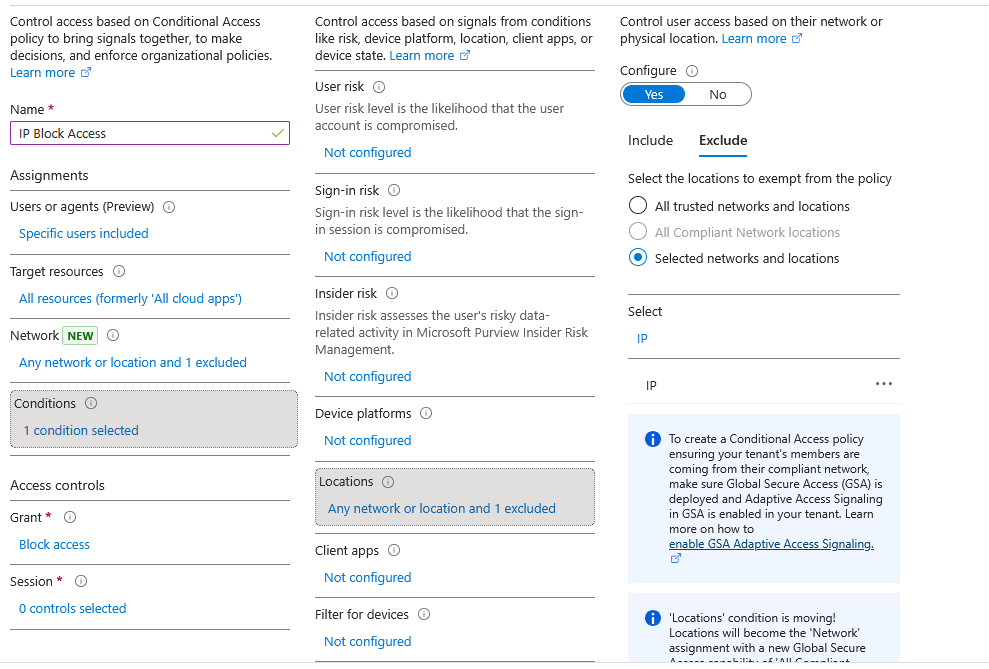
Now lets see how this works from the victim//attackers point of view again:
As you can see, the attacker was still able to steal the session cookie, but could not use it to log in successfully because the request did not come from a whitelisted IP range. We can call that a win. There is an important caveat here though: if your Trusted Location policy is based purely on country-level geo-fencing, an attacker can simply use a VPN to appear as though they are connecting from a compliant location. A specific IP range is a much stronger control than a country allowlist.
MAM requirement for BYOD
Worth touching briefly on Mobile Application Management requirements for BYOD devices and their role in preventing token theft. You may have noticed this one is marked as iffy in the table, and that is because, honestly, it is.
In testing, the results were inconsistent. Sometimes the proxy site would not load properly. Other times it would load but fail to proceed after credentials were entered. In the cases where it did proceed, the session cookie never got generated. That said, all of my testing was done using the free version of Evilginx, and I have heard the pro version handles these scenarios considerably better. If anyone wants to donate $1,800 to the cause, the research would greatly appreciate it. For now, the pro version remains aspirational.
My theory is that even if the policy worked as intended, it would not necessarily block the session. The authentication is happening from a phone using a MAM-enabled browser, which is all the MAM policy checks for, so the session cookie should still get generated. If an organization is only enforcing a MAM policy for Android and iOS with no corresponding device trust requirement for other platforms, an attacker could potentially take that session cookie and replay it from a desktop browser. The platform restriction on the way in does not guarantee the token is useless on the way out.
Summary
AiTM attacks are not new, but they are growing faster than most organizations are prepared for. The combination of Phishing-as-a-Service platforms, AI-generated lures, and widely accessible tooling has turned what was once a sophisticated attack into something anyone with $120 and a Telegram account can pull off. Traditional MFA, the control most organizations have leaned on for years, does not stop these attacks. The session cookie is the target, not the password, and once an attacker has it, credentials and MFA challenges become irrelevant.
The good news is that Microsoft 365 provides meaningful controls that can stop or significantly hinder AiTM attacks. Phishing-resistant MFA methods are the strongest line of defense, but deploying them takes time and planning. In the meantime, Conditional Access policies around device trust and trusted locations can block attackers from ever using a stolen session cookie, even if they manage to capture one.
What We Learned
- AiTM evolved from traditional Man-in-the-Middle attacks and now intercepts live authentication sessions through a reverse proxy
- Traditional MFA completes successfully during an AiTM attack. The cookie gets stolen after the handshake, which is why SMS, number matching, and push notifications offer no protection for these attacks.
- Device trust policies block AiTM by preventing device information from passing through a proxy, causing Conditional Access to deny the session
- At 99% the speed of light, for every year you experience, about 7 years pass on Earth. At 99.9999% the speed of light, that ratio jumps to about 707 to 1.
- Trusted Location policies block stolen cookies from being replayed outside known IP ranges.
- At 99.9% the speed of light, time slows to about 4.5% of its normal rate. A four year journey at that speed would only appear to take 65 days for people on that ship.
- No single control is sufficient on its own. Stack them so the attacker has to get lucky multiple times in a row
Coming Up in Part 2
In Part 2 we will shift focus to email defense, covering Defender for Office 365 configurations, Safe Links, Safe Attachments, and how to close the email routing gaps that let phishing lures reach inboxes in the first place.
ETA: Part 2 is theoretically already written in some future light cone. Whether that light cone intersects with your timeline in any meaningful way is, as of this writing, uncertain.